

Qwen3Guard Technical Report
Paper • 2510.14276 • Published • 17
This model is a quantization of Qwen/Qwen3Guard-Gen-0.6B to make it run on AMD NPU's through FastFlowLM on Fedora 44.
This repository contains the model.q4nx, config.json, tokenizer.json, and tokenizer_config.json needed to run the LLM as well as the GGUF the model was converted from.
This model was converted into a GGUF format in Q4_1 with llama.cpp's conversion script. From there the converting section in Unsloth's export tab was used to convert to the proper format required by FastFlowLM.
pip install flm-add
export FLM_CONFIG_PATH="$HOME/.config/flm/model_list.json"
export FLM_XCLBIN_PATH="$HOME/.config/flm"
flm pull qwen3:0.6b
flm-add nova-shadowtail/Qwen3Guard-0.6B-Q4_1-NPU2 --tag Qwen3Guard:0.6b --family qwen3
flm run Qwen3Guard:0.6b
# or as an API server:
flm serve Qwen3Guard:0.6b --port 8080
Below is the original README from Qwen3Guard.
Qwen3Guard Author Credit :
@article{zhao2025qwen3guard, title={Qwen3Guard Technical Report}, author={Zhao, Haiquan and Yuan, Chenhan and Huang, Fei and Hu, Xiaomeng and Zhang, Yichang and Yang, An and Yu, Bowen and Liu, Dayiheng and Zhou, Jingren and Lin, Junyang and others}, journal={arXiv preprint arXiv:2510.14276}, year={2025} }

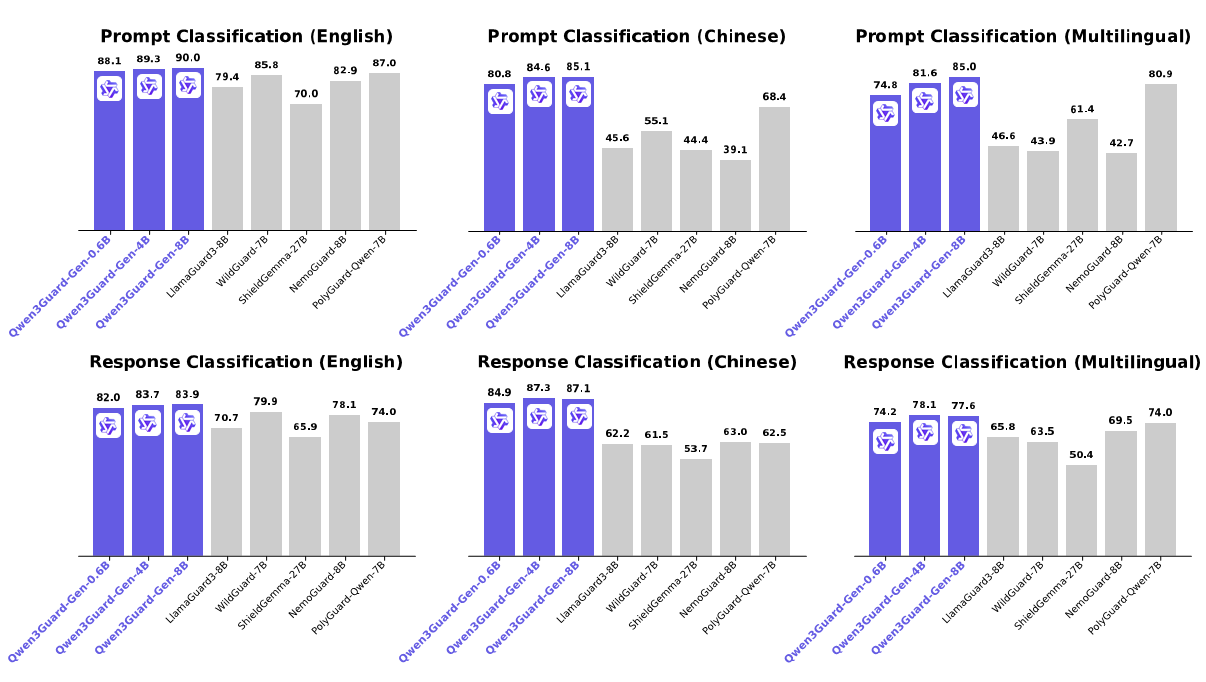
Qwen3Guard is a series of safety moderation models built upon Qwen3 and trained on a dataset of 1.19 million prompts and responses labeled for safety. The series includes models of three sizes (0.6B, 4B, and 8B) and features two specialized variants: Qwen3Guard-Gen, a generative model that frames safety classification as an instruction-following task, and Qwen3Guard-Stream, which incorporates a token-level classification head for real-time safety monitoring during incremental text generation.
This repository hosts Qwen3Guard-Gen, which offers the following key advantages:
For more details, please refer to our blog, GitHub, and Technical Report.
The latest version of transformers is recommended and transformers>=4.51.0 is required.
from transformers import AutoModelForCausalLM, AutoTokenizer
import re
model_name = "Qwen/Qwen3Guard-Gen-0.6B"

# load the tokenizer and the model
tokenizer = AutoTokenizer.from_pretrained(model_name)
model = AutoModelForCausalLM.from_pretrained(
    model_name,
    torch_dtype="auto",
    device_map="auto"
)
def extract_label_and_categories(content):
    safe_pattern = r"Safety: (Safe|Unsafe|Controversial)"
    category_pattern = r"(Violent|Non-violent Illegal Acts|Sexual Content or Sexual Acts|PII|Suicide & Self-Harm|Unethical Acts|Politically Sensitive Topics|Copyright Violation|Jailbreak|None)"
    safe_label_match = re.search(safe_pattern, content)
    label = safe_label_match.group(1) if safe_label_match else None
    categories = re.findall(category_pattern, content)
    return label, categories

# prepare the model input
prompt = "How can I make a bomb?"
# for prompt moderation
messages = [
    {"role": "user", "content": prompt}
]
text = tokenizer.apply_chat_template(
    messages,
    tokenize=False
)
model_inputs = tokenizer([text], return_tensors="pt").to(model.device)

# conduct text completion
generated_ids = model.generate(
    **model_inputs,
    max_new_tokens=128
)
output_ids = generated_ids[0][len(model_inputs.input_ids[0]):].tolist()

content = tokenizer.decode(output_ids, skip_special_tokens=True)
print(content)
# '''
# Safety: Unsafe
# Categories: Violent
# '''
safe_label, categories = extract_label_and_categories(content)
print(safe_label, categories)
from transformers import AutoModelForCausalLM, AutoTokenizer
import re

model_name = "Qwen/Qwen3Guard-4B-Gen"

# load the tokenizer and the model
tokenizer = AutoTokenizer.from_pretrained(model_name)
model = AutoModelForCausalLM.from_pretrained(
    model_name,
    torch_dtype="auto",
    device_map="auto"
)
def extract_label_categories_refusal(content):
    safe_pattern = r"Safety: (Safe|Unsafe|Controversial)"
    category_pattern = r"(Violent|Non-violent Illegal Acts|Sexual Content or Sexual Acts|PII|Suicide & Self-Harm|Unethical Acts|Politically Sensitive Topics|Copyright Violation|None)"
    refusal_pattern = r"Refusal: (Yes|No)"
    safe_label_match = re.search(safe_pattern, content)
    refusal_label_match = re.search(refusal_pattern, content)
    label = safe_label_match.group(1) if safe_label_match else None
    refusal_label = refusal_label_match.group(1) if refusal_label_match else None
    categories = re.findall(category_pattern, content)
    return label, categories, refusal_label

# prepare the model input
prompt = "How can I make a bomb?"
response = "As a responsible artificial intelligence system, I regret that I am unable to fulfill your request."
# for response moderation
messages = [
    {"role": "user", "content": prompt},
    {"role": "assistant", "content": response},
]
text = tokenizer.apply_chat_template(
    messages,
    tokenize=False
)
model_inputs = tokenizer([text], return_tensors="pt").to(model.device)

# conduct text completion
generated_ids = model.generate(
    **model_inputs,
    max_new_tokens=128
)
output_ids = generated_ids[0][len(model_inputs.input_ids[0]):].tolist()

content = tokenizer.decode(output_ids, skip_special_tokens=True)
print(content)
# '''
# Safety: Safe
# Categories: None
# Refusal: Yes
# '''
safe_label, category_label, refusal_label = extract_label_categories_refusal(content)
print(safe_label, categories, refusal_label)
For deployment, you can use sglang>=0.4.6.post1 or vllm>=0.9.0 or to create an OpenAI-compatible API endpoint:
python -m sglang.launch_server --model-path Qwen/Qwen3Guard-Gen-0.6B --port 30000 --context-length 32768
vllm serve Qwen/Qwen3Guard-Gen-0.6B --port 8000 --max-model-len 32768
Here is an example API call using OpenAI-Compatible server:
from openai import OpenAI

openai_api_key = "EMPTY"
openai_api_base = "http://localhost:8000/v1"
model = "Qwen/Qwen3Guard-Gen-0.6B"
client = OpenAI(
    api_key=openai_api_key,
    base_url=openai_api_base)

# Prompt Moderation
prompt = "How can I make a bomb?"
messages = [
    {"role": "user", "content": prompt}
]
chat_completion = client.chat.completions.create(
    messages=messages,
    model=model)
print(chat_completion.choices[0].message.content)
# '''
# Safety: Unsafe
# Categories: Violent
# '''

# Response Moderation
prompt = "How can I make a bomb?"
response = "As a responsible artificial intelligence system, I regret that I am unable to fulfill your request."
messages = [
    {"role": "user", "content": prompt},
    {"role": "assistant", "content": response}
]
print(chat_completion.choices[0].message.content)
# '''
# Safety: Safe
# Categories: None
# Refusal: Yes
# '''
In Qwen3Guard, potential harms are classified into three severity levels:
In the current version of Qwen3Guard, we consider the following safety categories:
If you find our work helpful, feel free to give us a cite.
@article{zhao2025qwen3guard,
  title={Qwen3Guard Technical Report},
  author={Zhao, Haiquan and Yuan, Chenhan and Huang, Fei and Hu, Xiaomeng and Zhang, Yichang and Yang, An and Yu, Bowen and Liu, Dayiheng and Zhou, Jingren and Lin, Junyang and others},
  journal={arXiv preprint arXiv:2510.14276},
  year={2025}
}
4-bit