

Instructions to use QuantFactory/functionary-small-v2.2-GGUF with libraries, inference providers, notebooks, and local apps. Follow these links to get started.
- Libraries
- Transformers
How to use QuantFactory/functionary-small-v2.2-GGUF with Transformers:
# Use a pipeline as a high-level helper from transformers import pipeline pipe = pipeline("text-generation", model="QuantFactory/functionary-small-v2.2-GGUF") messages = [ {"role": "user", "content": "Who are you?"}, ] pipe(messages)# Load model directly from transformers import AutoModel model = AutoModel.from_pretrained("QuantFactory/functionary-small-v2.2-GGUF", dtype="auto") - llama-cpp-python
How to use QuantFactory/functionary-small-v2.2-GGUF with llama-cpp-python:
# !pip install llama-cpp-python from llama_cpp import Llama llm = Llama.from_pretrained( repo_id="QuantFactory/functionary-small-v2.2-GGUF", filename="functionary-small-v2.2.Q2_K.gguf", )
llm.create_chat_completion( messages = [ { "role": "user", "content": "What is the capital of France?" } ] ) - Notebooks
- Google Colab
- Kaggle
- Local Apps
- llama.cpp
How to use QuantFactory/functionary-small-v2.2-GGUF with llama.cpp:
Install from brew
brew install llama.cpp # Start a local OpenAI-compatible server with a web UI: llama-server -hf QuantFactory/functionary-small-v2.2-GGUF:Q4_K_M # Run inference directly in the terminal: llama-cli -hf QuantFactory/functionary-small-v2.2-GGUF:Q4_K_M
Install from WinGet (Windows)
winget install llama.cpp # Start a local OpenAI-compatible server with a web UI: llama-server -hf QuantFactory/functionary-small-v2.2-GGUF:Q4_K_M # Run inference directly in the terminal: llama-cli -hf QuantFactory/functionary-small-v2.2-GGUF:Q4_K_M
Use pre-built binary
# Download pre-built binary from: # https://github.com/ggerganov/llama.cpp/releases # Start a local OpenAI-compatible server with a web UI: ./llama-server -hf QuantFactory/functionary-small-v2.2-GGUF:Q4_K_M # Run inference directly in the terminal: ./llama-cli -hf QuantFactory/functionary-small-v2.2-GGUF:Q4_K_M
Build from source code
git clone https://github.com/ggerganov/llama.cpp.git cd llama.cpp cmake -B build cmake --build build -j --target llama-server llama-cli # Start a local OpenAI-compatible server with a web UI: ./build/bin/llama-server -hf QuantFactory/functionary-small-v2.2-GGUF:Q4_K_M # Run inference directly in the terminal: ./build/bin/llama-cli -hf QuantFactory/functionary-small-v2.2-GGUF:Q4_K_M
Use Docker
docker model run hf.co/QuantFactory/functionary-small-v2.2-GGUF:Q4_K_M
- LM Studio
- Jan
- vLLM
How to use QuantFactory/functionary-small-v2.2-GGUF with vLLM:
Install from pip and serve model
# Install vLLM from pip: pip install vllm # Start the vLLM server: vllm serve "QuantFactory/functionary-small-v2.2-GGUF" # Call the server using curl (OpenAI-compatible API): curl -X POST "http://localhost:8000/v1/chat/completions" \ -H "Content-Type: application/json" \ --data '{ "model": "QuantFactory/functionary-small-v2.2-GGUF", "messages": [ { "role": "user", "content": "What is the capital of France?" } ] }'Use Docker
docker model run hf.co/QuantFactory/functionary-small-v2.2-GGUF:Q4_K_M
- SGLang
How to use QuantFactory/functionary-small-v2.2-GGUF with SGLang:
Install from pip and serve model
# Install SGLang from pip: pip install sglang # Start the SGLang server: python3 -m sglang.launch_server \ --model-path "QuantFactory/functionary-small-v2.2-GGUF" \ --host 0.0.0.0 \ --port 30000 # Call the server using curl (OpenAI-compatible API): curl -X POST "http://localhost:30000/v1/chat/completions" \ -H "Content-Type: application/json" \ --data '{ "model": "QuantFactory/functionary-small-v2.2-GGUF", "messages": [ { "role": "user", "content": "What is the capital of France?" } ] }'Use Docker images
docker run --gpus all \ --shm-size 32g \ -p 30000:30000 \ -v ~/.cache/huggingface:/root/.cache/huggingface \ --env "HF_TOKEN=<secret>" \ --ipc=host \ lmsysorg/sglang:latest \ python3 -m sglang.launch_server \ --model-path "QuantFactory/functionary-small-v2.2-GGUF" \ --host 0.0.0.0 \ --port 30000 # Call the server using curl (OpenAI-compatible API): curl -X POST "http://localhost:30000/v1/chat/completions" \ -H "Content-Type: application/json" \ --data '{ "model": "QuantFactory/functionary-small-v2.2-GGUF", "messages": [ { "role": "user", "content": "What is the capital of France?" } ] }' - Ollama
How to use QuantFactory/functionary-small-v2.2-GGUF with Ollama:
ollama run hf.co/QuantFactory/functionary-small-v2.2-GGUF:Q4_K_M
- Unsloth Studio new
How to use QuantFactory/functionary-small-v2.2-GGUF with Unsloth Studio:
Install Unsloth Studio (macOS, Linux, WSL)
curl -fsSL https://unsloth.ai/install.sh | sh # Run unsloth studio unsloth studio -H 0.0.0.0 -p 8888 # Then open http://localhost:8888 in your browser # Search for QuantFactory/functionary-small-v2.2-GGUF to start chatting
Install Unsloth Studio (Windows)
irm https://unsloth.ai/install.ps1 | iex # Run unsloth studio unsloth studio -H 0.0.0.0 -p 8888 # Then open http://localhost:8888 in your browser # Search for QuantFactory/functionary-small-v2.2-GGUF to start chatting
Using HuggingFace Spaces for Unsloth
# No setup required # Open https://huggingface.co/spaces/unsloth/studio in your browser # Search for QuantFactory/functionary-small-v2.2-GGUF to start chatting
- Pi new
How to use QuantFactory/functionary-small-v2.2-GGUF with Pi:
Start the llama.cpp server
# Install llama.cpp: brew install llama.cpp # Start a local OpenAI-compatible server: llama-server -hf QuantFactory/functionary-small-v2.2-GGUF:Q4_K_M
Configure the model in Pi
# Install Pi: npm install -g @mariozechner/pi-coding-agent # Add to ~/.pi/agent/models.json: { "providers": { "llama-cpp": { "baseUrl": "http://localhost:8080/v1", "api": "openai-completions", "apiKey": "none", "models": [ { "id": "QuantFactory/functionary-small-v2.2-GGUF:Q4_K_M" } ] } } }Run Pi
# Start Pi in your project directory: pi
- Hermes Agent new
How to use QuantFactory/functionary-small-v2.2-GGUF with Hermes Agent:
Start the llama.cpp server
# Install llama.cpp: brew install llama.cpp # Start a local OpenAI-compatible server: llama-server -hf QuantFactory/functionary-small-v2.2-GGUF:Q4_K_M
Configure Hermes
# Install Hermes: curl -fsSL https://hermes-agent.nousresearch.com/install.sh | bash hermes setup # Point Hermes at the local server: hermes config set model.provider custom hermes config set model.base_url http://127.0.0.1:8080/v1 hermes config set model.default QuantFactory/functionary-small-v2.2-GGUF:Q4_K_M
Run Hermes
hermes
- Docker Model Runner
How to use QuantFactory/functionary-small-v2.2-GGUF with Docker Model Runner:
docker model run hf.co/QuantFactory/functionary-small-v2.2-GGUF:Q4_K_M
- Lemonade
How to use QuantFactory/functionary-small-v2.2-GGUF with Lemonade:
Pull the model
# Download Lemonade from https://lemonade-server.ai/ lemonade pull QuantFactory/functionary-small-v2.2-GGUF:Q4_K_M
Run and chat with the model
lemonade run user.functionary-small-v2.2-GGUF-Q4_K_M
List all available models
lemonade list
QuantFactory/functionary-small-v2.2-GGUF
This is quantized version of meetkai/functionary-small-v2.2 created using llama.cpp
Original Model Card
Model Card for functionary-small-v2.2
https://github.com/MeetKai/functionary

Functionary is a language model that can interpret and execute functions/plugins.
The model determines when to execute functions, whether in parallel or serially, and can understand their outputs. It only triggers functions as needed. Function definitions are given as JSON Schema Objects, similar to OpenAI GPT function calls.
Key Features
- Intelligent parallel tool use
- Able to analyze functions/tools outputs and provide relevant responses grounded in the outputs
- Able to decide when to not use tools/call functions and provide normal chat response
- Truly one of the best open-source alternative to GPT-4
Performance
Our model achieves achieves state-of-the-art performance in Function Calling Accuracy on our in-house dataset. The accuracy metric measures the overall correctness of predicted function calls, including function name prediction and arguments extraction.
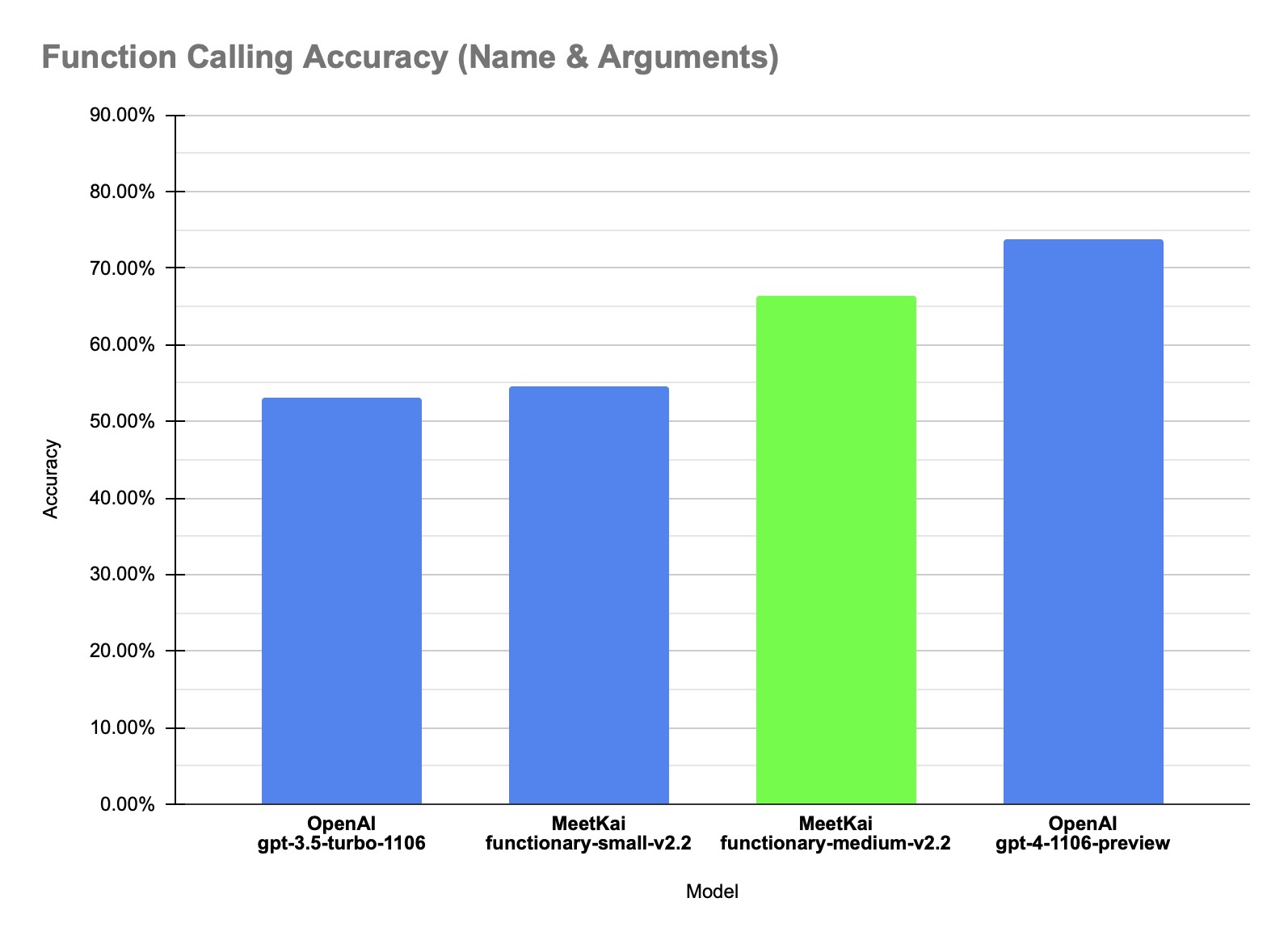
| Dataset | Model Name | Function Calling Accuracy (Name & Arguments) |
|---|---|---|
| In-house data | MeetKai-functionary-small-v2.2 | 0.546 |
| In-house data | MeetKai-functionary-medium-v2.2 | 0.664 |
| In-house data | OpenAI-gpt-3.5-turbo-1106 | 0.531 |
| In-house data | OpenAI-gpt-4-1106-preview | 0.737 |
Prompt Template
We use a specially designed prompt template which we call "v2PromptTemplate" that breaks down each turns into from, recipient and content portions.
We convert function definitions to a similar text to TypeScript definitions. Then we inject these definitions as system prompts. After that, we inject the default system prompt. Then we start the conversation messages.
This formatting is also available via our vLLM server which we process the functions into Typescript definitions encapsulated in a system message and use a pre-defined Transformers chat template. This means that lists of messages can be formatted for you with the apply_chat_template() method within our server:
from openai import OpenAI
client = OpenAI(base_url="http://localhost:8000/v1", api_key="functionary")
client.chat.completions.create(
model="path/to/functionary/model/",
messages=[{"role": "user",
"content": "What is the weather for Istanbul?"}
],
tools=[{
"type": "function",
"function": {
"name": "get_current_weather",
"description": "Get the current weather",
"parameters": {
"type": "object",
"properties": {
"location": {
"type": "string",
"description": "The city and state, e.g. San Francisco, CA"
}
},
"required": ["location"]
}
}
}],
tool_choice="auto"
)
will yield:
<|from|>system
<|recipient|>all
<|content|>// Supported function definitions that should be called when necessary.
namespace functions {
// Get the current weather
type get_current_weather = (_: {
// The city and state, e.g. San Francisco, CA
location: string,
}) => any;
} // namespace functions
<|from|>system
<|recipient|>all
<|content|>A chat between a curious user and an artificial intelligence assistant. The assistant gives helpful, detailed, and polite answers to the user's questions. The assistant calls functions with appropriate input when necessary
<|from|>user
<|recipient|>all
<|content|>What is the weather for Istanbul?
A more detailed example is provided here.
Run the model
We encourage users to run our models using our OpenAI-compatible vLLM server here.
The MeetKai Team

- Downloads last month
- 15
2-bit
3-bit
4-bit
5-bit
6-bit
8-bit


