# DreamcastHDMI / DCDigital
#### 2021-02-20 *Firmware v4.9* (*Unified*)
- Asynchronous WiFi setup, solves issue #17
#### 2021-01-08 *Firmware v4.8* (*Unified*)
- Fixed: issue #16: Web console incompatibilities with newer browsers
#### 2020-09-14 *Firmware v4.7* (*Unified*)
- Installer access point (IAP) mode
To start IAP mode: `L` + `start` + `X` + `Y` + `A` + `B`
This sets up an access point with predefined credentials, an OSD screen warns about insecure WiFi credentials.
IAP credentials are:
```
WiFi SSID: DCDigital-Install
WiFi Password: installme!
HTTP Username: please
HTTP Password: installme!
IP Address: 192.168.4.1
```
- Fixed: `very thin` scanlines now work in Relaxed firmware too
- ESP firmware is now built using PlatformIO 5.0.1
- ESP new default filesystem is [LittleFS](https://github.com/ARMmbed/littlefs).
*Optional: [Filesytem Migration Guide](FS_Migration.md)*
- Fixed: PAL bob deinterlacing setting was overwritten by NTSC passthru setting, which resulted in corrupted image.
#### 2020-08-27 *Firmware v4.6* (*Unified*)
- Fixed: LED pattern when no input clock is present
- ESP firmware is now built using PlatformIO 4.3.4
- Scanlines: New `very thin` setting (Thanks to @SvtTerminator)
- Generated passwords: Avoid ambiguous characters.
#### 2020-05-17 *Firmware v4.5* (*Unified*)
- Terraonion MODE disc switch support
#### 2020-02-28 *Firmware v4.4* (*Unified*)
- New name/logo
#### 2019-11-17 *Firmware v4.3* (*Unified*)
- New: **Color expansion**
A lot, if not most Dreamcast games are using 16bit color (RGB565), so blue and red are only using the upper 5bit and green uses the upper 6bit in the 8bit data coming from the console.
So a full white picture in RGB565 is (248,252,248) instead of (255,255,255). The new color expansion feature converts the 5bit/6bit color to 8bit using this formula:
```
out8 = in5 | in5 >> 5;
out8 = in6 | in6 >> 6;
```
The settings for ***Color expansion*** are:
- **Off** No color expansion is done.
- **Auto** DCHDMI tries to detect the color mode used and automatically selects the proper expansion mode. *Seems to work fine, but detection may fail, if the image contents are ambiguous.*
- **RGB565** 16bit to 24bit expansion
- **RGB555** 15bit to 24bit expansion
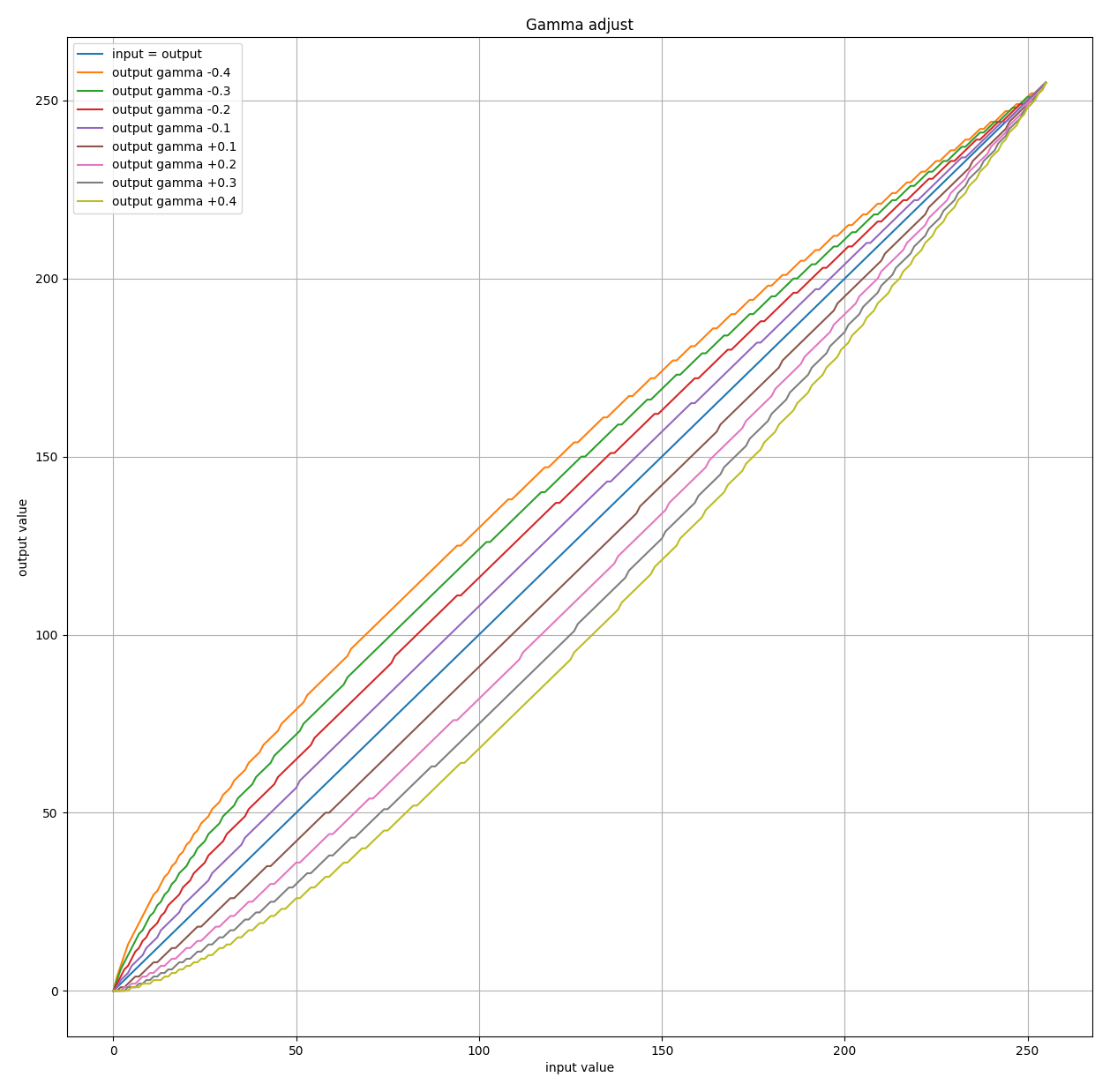
- New: **Gamma adjust**
This can be used to adjust the gamma of the video image. Currently these predefined adjustments are possible:
*Click on image to enlarge*
[ ](https://dc.i74.de/gamma-adjust.png)
#### 2019-09-27 *Firmware v4.2* (*Unified*)
- MDNS initialization can cause a crash leading to reset loop on startup, so MDNS is deactivated until fix is available on esp8266 arduino stable branch. (https://github.com/esp8266/Arduino/pull/6261/commits/7d8bb51a8059a673bd57efba03b04142a0ba9d35)
#### 2019-09-20 *Firmware v4.1* (*Unified*)
- Fixed: Memory overflow in osd write.
This can cause DCHDMI to restart during firmware download. If this happens, just restart the download again until it finishes or use the [Web console](Web_console.md) to update firmware.
- New: Control OSD with an arcade stick.
| Device | How to open OSD | Notes |
| --- | --- | --- |
| Standard controller | `Left Trigger` + `Right Trigger` + `X` + `A` + `Start` | |
| Dreamcast Keyboard | `CTRL`+`SHIFT`+`ESC` | See [Keyboard reference](Keyboard.md) for details |
| Arcade stick | `Y` + `B` + `Z` + `C` + `Start` | `C` maps to `R-trigger`/`ok`
](https://dc.i74.de/gamma-adjust.png)
#### 2019-09-27 *Firmware v4.2* (*Unified*)
- MDNS initialization can cause a crash leading to reset loop on startup, so MDNS is deactivated until fix is available on esp8266 arduino stable branch. (https://github.com/esp8266/Arduino/pull/6261/commits/7d8bb51a8059a673bd57efba03b04142a0ba9d35)
#### 2019-09-20 *Firmware v4.1* (*Unified*)
- Fixed: Memory overflow in osd write.
This can cause DCHDMI to restart during firmware download. If this happens, just restart the download again until it finishes or use the [Web console](Web_console.md) to update firmware.
- New: Control OSD with an arcade stick.
| Device | How to open OSD | Notes |
| --- | --- | --- |
| Standard controller | `Left Trigger` + `Right Trigger` + `X` + `A` + `Start` | |
| Dreamcast Keyboard | `CTRL`+`SHIFT`+`ESC` | See [Keyboard reference](Keyboard.md) for details |
| Arcade stick | `Y` + `B` + `Z` + `C` + `Start` | `C` maps to `R-trigger`/`ok`
`Z` maps to `L-trigger`/`cancel` |
- Fixed: Do not drive pin 6, when in `Cable Detect` mode (Thanks to Ste!)
- New: Display WiFi signal quality and channel on `Test/Info` OSD screen.
- Documentation: [DCHDMI LED status patterns](DCHDMI-LED.md)
- ***Regarding WiFi connection and firmware updates:***
DCHDMI connects - when SSID and password are configured - to your local WiFi network immediately after startup, but it will not send out any information by itself, without you actually checking and/or downloading new firmware.
If you are connected to a network and access the `Firmware` -> `Check`/`Download` function, it sends out your desired firmware release (`master`/`develop`/...) and your IP address. No further personal data is sent: no serial number, no SSID/passwords/config data.
This can be easily verified by checking out the firmware/software here: [DreamcastHDMI](https://github.com/chriz2600/DreamcastHDMI)
I encourage everyone to do so. If you want, you can easily build your own update server. Everything needed to do so is in this project. If you have questions, don't hesitate to contact me.
This firmware/software will always remain free and will always only send out the minimum information required to perform a firmware upgrade.
Also check out [Web console](Web_console.md) documentation, on how to perform a firmware update without connecting your DCHDMI to a WiFi network.
#### 2019-08-25 *Firmware v4.0* (*Unified*)
- *Standard (**-std**)* and *Relaxed (**-rlx**)* firmware flavours are now combined into one firmware release. When changing firmware flavour only the fpga firmware gets re-flashed from the firmware bundle downloaded previously.
*When upgrading to v4.0 for the first time, it's necessary to update the firmware once again, to download this new bundle.*
- ESP firmware is now built using PlatformIO 4.0.0
- ESP: Redone I2C command scheduling and moved OSD menus to the progmem area to free up heap memory.
- Fixed the following bug:
- [Issue #4: 31KHz 480p output has display area shifted left](https://github.com/chriz2600/DreamcastHDMI/issues/4)
Horizontal position for VGA can now be set in the OSD (Advanced Video Settings). There is also an *auto* option which detects the correct position, if an image with non-black pixels on the edges is detected.
*Default is auto. To force correct position for the majority of commercial games, set to **`0`***
**Big thanks to [rdaviesuk](https://github.com/rdaviesuk) for reporting!**
- Added the following features:
- [Issue #5: Please add support for PAL 288p video output](https://github.com/chriz2600/DreamcastHDMI/issues/5)
288p is now supported.
- [Issue #6: Please allow differing deinterlacing method for 480i/576i](https://github.com/chriz2600/DreamcastHDMI/issues/6)
Deinterlacing can now be configured for 480i/576i separately.
**Thanks again, [rdaviesuk](https://github.com/rdaviesuk) for reporting!**
- [Keyboard support to control DCHDMI OSD](Keyboard.md)
- Fixed: Prevent OSD from picking up controller buttons while opening OSD.
#### 2019-08-09 *Firmware v3.0.4* (*Relaxed*)
- Finally fixed: video output may not start on some systems
#### 2019-07-31 *Firmware v3.0.3* (*Relaxed*)
- Fixed: video output may not start when configured to VGA/CableDetect
- Fixed: bob deinterlacing was not properly aligned in VGA/480p mode
#### 2019-06-16 *Firmware v3.0.2* (*Relaxed*)
- Fixed: Scanlines are now applied post HQ2X filter. (Thanks to SONIC3D!)
- Fixed: Adjusted input data latch clock phase shift to be more robust (Thanks to Ste!)
#### 2019-04-20 *Firmware v3.0.0* (*Relaxed*)
- New: ***Upscaling mode*** configuration option.
Currently available: ***2x*** and ***hq2x***
There will be more (e.g. anti aliasing) upscale filters in the future.
- Fixed: OSD position is now excactly the same for all output modes :)
#### 2019-04-20 *Firmware v2.3.0* (*Standard*)
- New: ***RGB color space*** (Advanced Video Settings) configuration option.
- New: Menu option to configure firmware flavour (Firmware Upgrade->Configure):
- ***Relaxed***
Allows filtered upscaling (currently HQ2X) by using relaxed HDMI timings.
- ***Standard***
Fully HDMI compliant.
- New: Improved output resolution switching time.
- Fixed: 480i bob deinterlacing wasn't properly aligned for 960p/1080p output.
- Internal: Properly queue osd write requests.
#### 2019-02-06 *Firmware v2.2.0*
- Fixed: It was possible to flash a firmware file from the OSD, which was only partially downloaded or corrupt.
It was possible to brick DCHDMI with that, so access to the serial port was necessary to fix. Starting with v2.2.0 the checksum is verified before flashing to prevent flashing a broken firmware.
*this only affected the firmware upgrade via OSD, the web interface upgrade was already performing this check*
Instructions on how to recover can be found here: [How to recover from a corrupted ESP firmware](Recovery.md)
#### 2019-02-01 *Firmware v2.1.1*
- Improved HDMI compliance
- Use recommended values for 44.1kHz audio in 1080p mode
- Use limited RGB range for all output resolutions other than VGA
- Improved reliability
- Removed `ESP.eraseConfig()` on full reset as this can lead to SPIFFS corruption in some rare cases.
- Disabled persisting WiFi credentials to ESP internal config area (they are already stored in flash file system), to reduce flash wear.
#### 2019-01-22 *Firmware v2.1.0*
***Update is highly recommended!***
- Improved WiFi security
- `WiFi Setup` OSD screen now displays the actual WiFi mode it's in (`Connected`/`Access point`)
- WiFi AP password is now being generated every time DCHDMI enters `Access point` mode.
- Generated WiFi AP password password can be displayed in `WiFi Setup` OSD screen.
- If no *web console* `HTTP Password` is set, it's also generated every time DCHDMI starts.
- `HTTP User` now defaults to `dchdmi` instead of `Test`
- The `HTTP Password` set can also be displayed in `WiFi Setup` OSD screen, unless `Protected mode` is set to `on` during `setup` procedure. (In this case you need access to the serial console, if you have forgotten your `HTTP Password`)
#### 2019-01-08 *Firmware v2.0.0*
- Bob deinterlacing can be deactivated via new `Advanced Video Settings`.
Set `Deinterlacer` to `passthru` to output 480i/576i.
- PAL support (576p bob deinterlaced or 576i passthru)
- OSD can show changelog after `Check` for new firmware.
- Web interface `setup` procedure shows available options and checks for valid input.
- GDEMU reset was available in main menu, even when disabled.
- Full reset (DC, ESP, FPGA) now available in `Reset DC`
- Video Mode can be changed by holding dpad up/down (`ForceVGA`/`CableDetect`) on startup/full reset.
- Lots of FPGA firmware improvements and refactoring.
#### 2018-12-18 *Firmware v1.2.0*
- All output modes (*VGA/480p/960p/1080p*) now support dreamcast 240p games.
Because video timing for 240p is different from 480i/p, the video output does not fully comply with the HDMI specification, so 960p/1080p may not work on all TVs (monitors usually work fine).
- For some 240p games the active video area is shifted to the right, so there is a new option under `Output Resolution` to compensate for that: `240p adjust position`
#### 2018-11-11
- Changed the button layout for the OSD control: *A* and *B* are now remapped to *R* and *L*, to reduce button conflicts with the game running in the background.
Thanks to ***-=FamilyGuy=-*** from the assemblergames forum for this idea!
- ESP firmware is now built using *PlatformIO, version 3.6.1*
#### 2018-09-20
- Updated the firmware to reflect the DCHDMI 1.3 hardware changes. The OSD now contains the following:
- **Output Resolution selection.**
Select *VGA*, *480p*, *960p* and *1080p* from the OSD.
- **Scanlines.**
*On/Off*, *Intensity*, *Odd/Even* and *Thick/Thin*
- **Video Mode Setup.**
Select *ForceVGA*, *CableSelect* and *SwitchTrick* for startup.
- **Firmware Upgrade.**
*Download* and *flash* new firmware from OSD, and also *reset* DCHDMI.
- **WiFi Setup.**
Enter *SSID* and *Password* for a quick wifi configuration from OSD.
- **Reset Configuration.**
DCHDMI can now reset the dreamcast. It can also reset the USB-GDROM (to return to the menu), in which case an additional connection is necassary. This pin can also be used to press the GDEMU button. By default it's connected to the onboard LED. So here you can configure to what and if this optional wire is connected.
- *LED:* use onboard diagnostic LED
- *GDEMU:* connected to the button on the GDEMU
- *USB-GDROM:* connected to the USB-GDROM reset circuit
#### 2018-09-03
- Finished OSD with the following features:
- **Output Resolution selection.**
Select *VGA*, *480p*, *960p* and *1080p* from the OSD.
- **Video Mode Setup.**
Select *ForceVGA*, *CableSelect* and *SwitchTrick* for startup.
- **Scanlines.**
*On/Off*, *Intensity*, *Odd/Even* and *Thick/Thin*
- **Firmware Upgrade.**
*Download* and *flash* new firmware from OSD, and also *reset* DCHDMI.
- **Debug Info.**
Debug information.
- Integrated **~~FirmwareManager~~ ESP companion** into this project, as the coupling between ESP and FPGA is very tight now.
- Added upscaling of 480i content to 960p/1080p.
#### 2018-08-14
- Dynamic reconfiguration of the output resolution.
Output resolution is now configurable via WiFi webinterface, OSD integration will follow soon.
- Removed 10CL016 and EP4CE6 support.
#### 2018-08-05
Updated the old 2017 block diagram to reflect some of the changes introduced since then:
![Block diagram 2018][DCblockNew]
#### 2018-07-29
- Maple bus integration to read controller data
Uses code by Marcus Comstedt (zeldin) from his [MapleMojo](https://github.com/zeldin/MapleMojo) project.
This enables leeching controller data directly from the maple bus to control the OSD.
- Added [I2C slave](https://opencores.org/project/i2cslave) implementation by Steve Fielding.
Enables ESP to write to OSD RAM and get the controller data aquired from the maple bus to control OSD.
#### 2018-07-17
##### Mainboard 1.2e *[Link](https://github.com/citrus3000psi/DCHDMI-Hardware)*
Finally finalized hardware 🎉 All interference issues are solved, we're now entering beta phase!
##### Rolling releases
The `master` branch will now contain the latest stable release. Development version moved to `develop`.
Firmware updates are easily downloaded and installed via WiFi [ESP companion](https://github.com/chriz2600/DreamcastHDMI/tree/bleeding/ESP).
Currently the following features are planned:
- OSD
- Output resolution switchable via OSD
- Dreamcast video mode control (pin6)
- 480p trick
- 240p x2 and x3 modes
- Disc based firmware updates
#### 2018-05-09
##### Mainboard 1.2d *[Link](https://github.com/citrus3000psi/DCHDMI-Hardware)*
Close to final FPGA mainboard by [citrus3000psi](https://twitter.com/citrus3000psi).
Some features are currently unused (e.g. pads for maple bus integration).
They will allow some cool firmware extensions in the future (e.g. OSD)
##### Flat flex 1.2a
[citrus3000psi](https://twitter.com/citrus3000psi) designed a flat flex cable, which connects the Mainboard to the audio and video dacs.
##### Cylcone 10 LP (10CL025):
We switched to a bigger FPGA to support more video output modes, 10CL016 and EP4CE6 are also supported.
| Output | Resolution | Notes | 10CL025 | 10CL016 | EP4CE6 |
|:-:| -:| - |:-:|:-:|:-:|
| VGA | 640x480 | **Correct** pixel/aspect ratio! | :white_check_mark: | :white_check_mark: | :white_check_mark: |
| 480p | 720x480 | Original output: usually only 640px of the available 720px are used.
**Incorrect** pixel/aspect ratio! | :white_check_mark: | :white_check_mark: | :white_check_mark: |
| 960p | 1280x960 | x2 VGA | :white_check_mark: | :white_check_mark: | :x: |
| 1080p | 1280x960 | x2 VGA, framed in 1920x1080 | :white_check_mark: | :x: | :x: |
##### Other firmware features
- basic 480i line doubling
- 240p support
- Scanlines.
Available by rebuilding the firmware and defining `SCANLINES_EVEN/SCANLINES_ODD`, `SCANLINES_THICK/SCANLINES_THIN` and `SCANLINES_INTENSITY` in `Macros.qsf`
- *Upcoming:* OSD. Maple bus connection is already on the 1.2d mainboard. Will be used in a later firmware.
#### 2018-03-05
Restructured source code and updated pin assignments for citrus3000psi's DCHDMI board 1.1:
- [Mainboard][citrus3000psi-oshpark-mainboard]
- [QSB][citrus3000psi-oshpark-qsb]
Moved older versions (without ADV7315 and/or ICS664-3) to [v0.1][v0.1]
Restructured "firmware" site:
- [Firmware][firmware]
Details on the available versions can be found [here][firmware-docs].
#### 2017-12-21
Added ESP-12 based firmware management tool, for upgrading firmware via WiFi.
- A demo of the ~~FirmwareManager~~ ESP companion could be found here: [Demo][dcfwdemo]
#### 2017-06-11
Many thanks to citrus3000psi for his work on a QSB (quick soldering board).
Check out the thread on the shmups forum: [DreamcastHDMI github by chriz2600][shmups]
#### 2017-05-29
New (auto)-build system using docker. [Build system using docker][docker]
#### 2017-04-23
Added schematics and some information on Cyclone IV + ADV7513 + ICS664-3 build: [CycloneIV-ADV7513-ICS664][builddoc]
#### 2017-04-18
A new version of the Cyclone IV + ADV7513 version is available [here][FPGA-CycloneIV-ADV7513-Enhanced].
Features in this version:
- Recoding of 480p (720x480) to VGA (640x480).
HDTVs will display correct 1:1 instead of 8:9 pixel ratio for 4:3 aspect ratio. To achieve the required clock multiplication/division an [ICS664-03] digitial video clock source is used.
320 pixel are buffered in RAM, so the delay from this will be 11.9us (microseconds, I will call this zero delay :) )
This diagram shows the setup:
![Block diagram][DCblock]
- Support for 480i and 240p by line doubling with recoding to 480p as above.
- Support for 480p/480i switching detection
Not in this version:
- PAL 576i support
---
#### 2017-03-27
##### Cheaper FPGA
Instead of a [DE0 Nano SOC][de0nanosoc] you can also use a [Waveshare CoreEP4CE6 Development Board][CoreEP4CE6]. You can get it for 20-25$ via [Aliexpress][AliCoreEP4CE6]. The project folder for this is [FPGA-CycloneIV]. Because the board does not expose any clock pins, you have to desolder the oscillator and attach the dreamcast clock directly to the board.
![Oscillator][CoreEP4CE6-Oscillator]
##### ADV7513
I also created a board for experimenting with the [Analog Devices ADV7513 HDMI Transmitter][ADV7513] which can be found [here][ADV7513p]. The verilog code for this can be found [here][FPGA-CycloneIV-ADV7513].
##### Direct HDMI output from FPGA
If you want to go the "cheap" DIY route, i've made a PCB for the [LVDS2TMDS][LVDS2TMDSboard] part.
##### Dreamcast video output
Some details about the Dreamcast scaling issue on modern HDTVs: [Video details link]
##### Roadmap
0. ~~Create cheaper solution based on simple FPGA development board.~~
0. ~~Use FPGA to enable 480p mode. Currently I have to plug in a VGA cable ;)~~
0. ~~Design FPGA board with Cyclone IV FPGA and ADV7513 transmitter. I'm planning to include some RAM to be able to implement 480i as well as basic upscaling later.
Edit: I don't need external RAM for line doubling.~~
0. ~~Design flat flex circuit to connect Dreamcast video DAC and audio DAC to FPGA board.~~
0. Detailed HOWTOs.
#### [Original documentation][maindoc]
---
[firmware-docs]: https://github.com/chriz2600/DreamcastHDMI/blob/master/Firmware.md
[firmware]: http://dc.i74.de/
[v0.1]: https://github.com/chriz2600/DreamcastHDMI/tree/v0.1
[citrus3000psi-oshpark-mainboard]: https://oshpark.com/shared_projects/N92txcNt
[citrus3000psi-oshpark-qsb]: https://oshpark.com/shared_projects/N0YmRkIu
[dcfwdemo]: http://dc-fw-manager.i74.de/
[docker]: https://github.com/chriz2600/DreamcastHDMI/blob/master/docker/README.md
[Quartus]: https://www.altera.com/products/design-software/fpga-design/quartus-prime/overview.html
[de0nanosoc]: http://www.terasic.com.tw/cgi-bin/page/archive.pl?Language=English&No=941
[UltraHDMI]: http://ultrahdmi.retroactive.be/
[UltraHDMI Flatflex]: http://cdn3.bigcommerce.com/s-c7bpm05/product_images/theme_images/ultrahdmi_carousel_2.png?t=1478293813
[Holguer A Becerra (spanish)]: https://sites.google.com/site/ece31289upb/practicas-de-clase/practica-4-sincronizadores/hdmi_de0-nano
[google translated version]: https://translate.google.com/translate?sl=es&tl=en&js=y&prev=_t&hl=de&ie=UTF-8&u=https%3A%2F%2Fsites.google.com%2Fsite%2Fece31289upb%2Fpracticas-de-clase%2Fpractica-4-sincronizadores%2Fhdmi_de0-nano&edit-text=
[FPGA4FUN]: http://fpga4fun.com/HDMI.html
[chipos81/charcole]: https://github.com/charcole/NeoGeoHDMI
[Public.Resource.Org]: https://law.resource.org/pub/12tables.html
[Technical Details]: https://rawgit.com/chriz2600/DreamcastHDMI/master/assets/index.html
[Video Details Link]: https://rawgit.com/chriz2600/DreamcastHDMI/master/assets/video.html
[IC401schematic]: https://github.com/chriz2600/DreamcastHDMI/raw/master/assets/VideoDAConSchematic.png
[IC401photo]: https://github.com/chriz2600/DreamcastHDMI/raw/master/assets/VideoDAC3.JPG
[IC401solderPoints]: https://github.com/chriz2600/DreamcastHDMI/raw/master/assets/VideoDACSolderingPoints.png
[DCvideo]: https://github.com/chriz2600/DreamcastHDMI/raw/master/assets/dc-video.png
[DCblock]: https://github.com/chriz2600/DreamcastHDMI/raw/master/assets/DC-Block.png
[DCblockNew]: https://dc.i74.de/DC-Block-201808.png
[dc-hso]: https://github.com/chriz2600/DreamcastHDMI/raw/master/Documents/Dreamcast_Hardware_Specification_Outline.pdf
[ADV7513]: https://github.com/chriz2600/DreamcastHDMI/raw/master/Documents/Datasheets/ADV7513.pdf
[PCM1725]: https://github.com/chriz2600/DreamcastHDMI/raw/master/Documents/Datasheets/pcm1725.pdf
[ICS664-03]: https://github.com/chriz2600/DreamcastHDMI/raw/master/Documents/Datasheets/IDT_664-03_DST_20100514.pdf
[LVDS2TMDS]: https://github.com/chriz2600/DreamcastHDMI/raw/master/assets/LVDS2TMDS.png
[LVDS2TMDS-breadboard]: https://github.com/chriz2600/DreamcastHDMI/raw/master/assets/LVDS2TMDS2.JPG
[IC303]: https://github.com/chriz2600/DreamcastHDMI/raw/master/assets/IC303.png
[Overview]: https://github.com/chriz2600/DreamcastHDMI/raw/master/assets/Overview.JPG
[CoreEP4CE6-Oscillator]: https://github.com/chriz2600/DreamcastHDMI/raw/master/assets/Waveshare-CoreEP4CE6.png
[HDMI1.3a]: https://github.com/chriz2600/DreamcastHDMI/raw/master/Documents/Specs/HDMISpecification13a.pdf
[HDMI1.4]: https://github.com/chriz2600/DreamcastHDMI/raw/master/Documents/Specs/HDMI-Specification-1.4.pdf
[EIA-CEA-861-D]: https://github.com/chriz2600/DreamcastHDMI/raw/master/Documents/Specs/EIA-CEA-861-D.pdf
[IEC-60958-3]: https://github.com/chriz2600/DreamcastHDMI/raw/master/Documents/Specs/is.iec.60958.3.2003.pdf
[CoreEP4CE6]: http://www.waveshare.com/wiki/CoreEP4CE6
[AliCoreEP4CE6]: https://www.aliexpress.com/item/Waveshare-Altera-Cyclone-Board-CoreEP4CE6-EP4CE6E22C8N-EP4CE6-ALTERA-Cyclone-IV-CPLD-FPGA-Development-Core-Board-Full/32643916772.html
[FPGA-CycloneIV]: https://github.com/chriz2600/DreamcastHDMI/tree/v0.1/FPGA-CycloneIV
[FPGA-CycloneIV-ADV7513]: https://github.com/chriz2600/DreamcastHDMI/tree/v0.1/FPGA-CycloneIV-ADV7513
[FPGA-CycloneIV-ADV7513-Enhanced]: https://github.com/chriz2600/DreamcastHDMI/tree/v0.1/FPGA-CycloneIV-ADV7513-Enhanced
[ADV7513]: http://www.analog.com/en/products/audio-video/analoghdmidvi-interfaces/analog-hdmidvi-display-interfaces/adv7513.html
[ADV7513p]: https://github.com/chriz2600/ADV7513
[LVDS2TMDSboard]: https://github.com/chriz2600/LVDS2TMDS
[maindoc]: https://github.com/chriz2600/DreamcastHDMI/blob/master/Documentation.md
[builddoc]: https://github.com/chriz2600/DreamcastHDMI/blob/master/Build.md
[shmups]: http://shmups.system11.org/viewtopic.php?f=6&t=59339